
Last Updated on July 4, 2024 by Arnav Sharma
Today, businesses of all sizes are aware that a successful journey to the cloud requires careful planning and deliberate execution. Achieving success with cloud technologies can be complex and time-consuming due to security, governance, cost optimization, and scalability issues. Azure Landing Zones represent an essential consideration for business leaders looking for an effective way to quickly get their organization up and running on the Microsoft Azure Cloud Platform. With Azure Landing Zones, organizations can rapidly deploy secure foundational infrastructure components necessary for successful production environments in the cloud. This article will overview how enterprises can maximize customer value by leveraging Azure Landing Zone capabilities.
What are Azure Landing Zones?
Azure Landing Zones are Microsoft Cloud Platform’s approach for businesses looking to run their organisation on the cloud quickly. It describes a suite of proven, well-architected reference implementations designed to help organizations build a secure foundation in Azure that provides governance and scalability while remaining cost-effective.
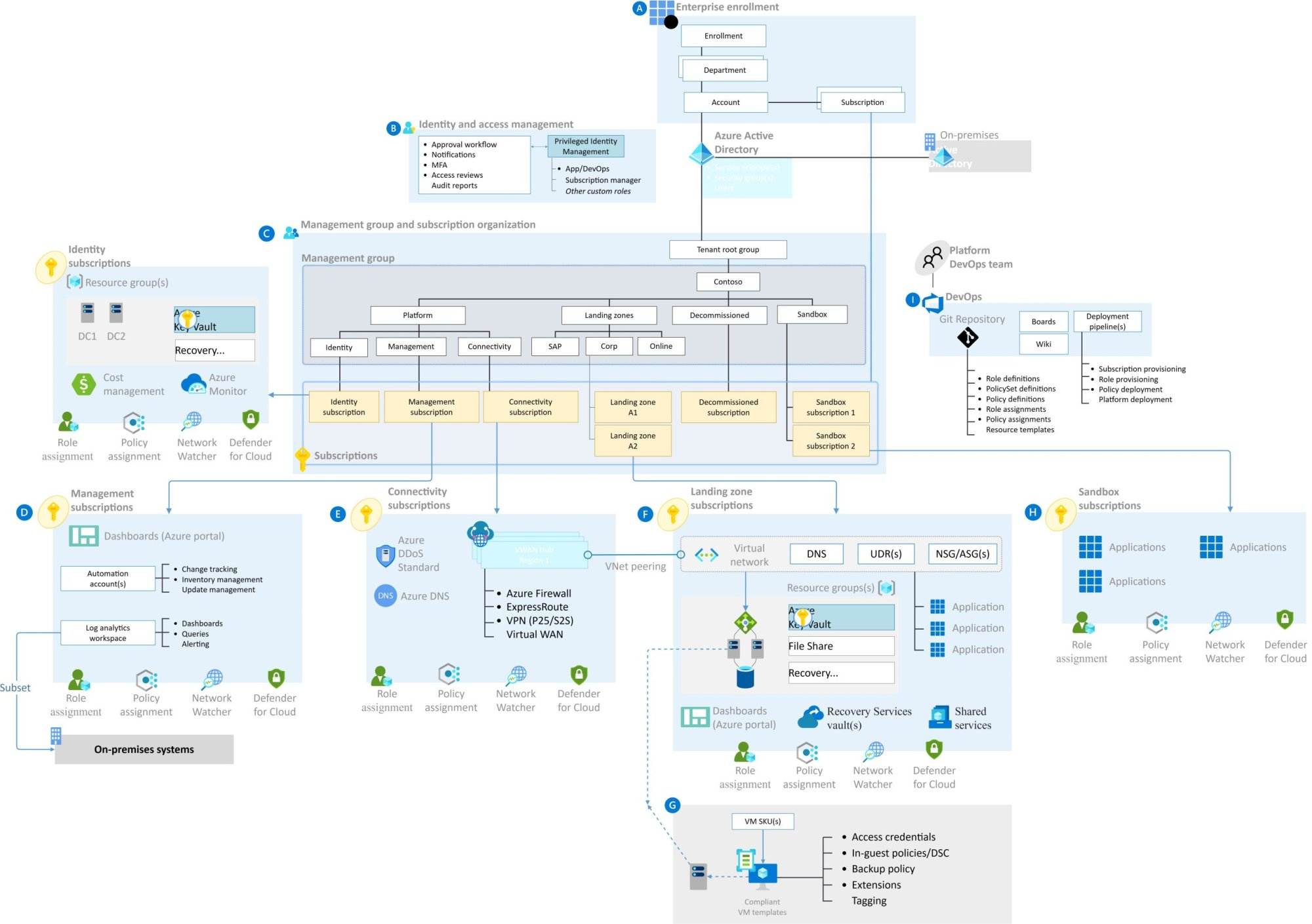
An Azure Landing Zone comprises multiple parts, including Infrastructure as Code (IaC) templates, which define all necessary components and dependencies; services such as security controls that provide deployment guidance, automation tools, and identity management; and subscription structures to allow access when needed. With IaC templates alone, customers can quickly create accounts and resource groups – repurposing these for projects again and again with relative ease. This ensures resources will be used appropriately without leading to an overpayment once up and running – additionally offering reused solutions, thus saving maintenance costs in the long run. Customers also benefit from enhanced resilience, allowing them to move away from vendor lock-in scenarios offering more diverse offerings if required at any time.
Benefits of Implementing Azure Landing Zones
In today’s business climate, companies of all sizes invest in cloud technology for a successful digital transformation. Azure Landing Zones provides organizations with a fast, secure way to start with Microsoft Azure Cloud Platform and quickly deploy foundational infrastructure components like virtual networks, identity security infrastructure and Subscriptions. These fundamental building blocks help businesses create an effective environment for the rapidly growing data sets related to their initiatives. Furthermore, deploying with Azure Landings Zone can ensure desired levels of governance and manageability throughout your deployment lifecycle.
Azure Landing Zones give users flexibility by providing uniformity across your landing zones when setting up complex multi-landscape environments or typical starter/development projects with similar architectures and functions. Adding additional steps helps reduce potential detrimental errors during deployment with automated checks for possible impacts on other running deployments simultaneously; endpoints being managed within an isolated separation framework based upon service model slots allocation per user segment is one valuable benefit afforded by using this methodology. Many Landing Zone templates come preconfigured, allowing administrators access to device-level control without spending extra resources configuring integrated policies from scratch. When implemented correctly, azure captures everything into a dependencies map which allows quickly following relationships between objects created & discover configurations across multiple services very quickly, just like ‘ready made’ Configuration Samples over many Organizations globally which potentially increases maintenance process productivity & reduces roll out cycles due getting every piece ready faster than before it also enabling more agile response in case there is any requirement changes after launch leveraging existing dependents map as reference quick speed them up further thing truly worth understanding before any such change request arrives!
Key Considerations for Designing an Azure Landing Zone
When designing an Azure Landing Zone, several key considerations must be remembered. The first step is to define the scope of services and infrastructure components needed to achieve the organization’s desired outcomes. This includes resource group hierarchy, access controls, networking layers, logging capabilities, and more. Considerations should also be given to DevOps automation strategies that enable fast and reliable deployments at scale while maintaining security standards.
Security must play a central role when implementing an Azure Landing Zone. All resources must follow secure configurations defined by policies, including identity management systems such as Multi-factor Authentication (MFA). Additionally, classification models can be set up within an organization to determine who has privileged access enabling admins with the proper permissions to scan for anomalies regularly. Lastly, cost optimization measures need to be implemented from the outset to ensure that organizations don’t incur unnecessary costs over time due to cloud computing services. Designing and adequately configuring your Azure Landing Zones requires competent resources and detailed planning – disregarding even one of these points can lead down a road fraught with problems both now and down the line. Careful consideration along every step of this process is critical for setting up successful foundational architecture for cloud operations’ success today and far into the future.
Azure Landing Zone Security Considerations
Azure Landing Zones provides organizations with a fast and secure way to set up their Microsoft Azure Cloud Platform infrastructure. The critical security consideration when deploying an Azure Landing Zone is determining which components are necessary for your organization’s cloud requirements, as well as evaluating the risks associated with each component. It’s essential to ensure that any chosen services meet all applicable regulatory guidelines, including data storage regulations and network access limitations; use of encryption; user authentication methods; role-based access controls for managing identities and permissions; and overall monitoring capabilities. It’s important to properly configure these settings from the start to minimize potential security vulnerabilities down the line.
Another notable security advantage of utilizing Azure Landing Zones is that it meets out-of-the-box best practices such as enabling multi-factor authentication (MFA) for every administrator account, following Role Based Access Control (RBAC) principles, establishing secure password policies for users, automatically deploying alerts for anomalous activities on resources within your environment or outside it – among others. These built-in functionalities help ensure sensitive information is always kept safe while providing oversight into potentially suspicious activity before it becomes more serious. Overall, investing time upfront will save you headaches by implementing robust security protocols at the outset of your cloud journey with Azure’s landing zones.
Best Practices for Streamlining the Deployment of an Azure Landing Zone
One of the best practices for streamlining the deployment of an Azure Landing Zone is to leverage automation as much as possible. Automation can help unlock tedious and manual tasks that often come with value provisioning and life-cycle management, allowing teams to spin up robust, secure operational environments at scale rapidly. This can be accomplished in several ways, including utilizing infrastructure-as-code (IaC) and DevOps techniques that allow organizations to quickly manage on-demand resources such as virtual machines or compute clusters using software development lifecycle principles such as continuous integration/delivery (CI/CD). Additionally, organizations should consider third-party tools like Ansible to increase the speed of rolling out simple workloads without sacrificing quality.
Another critical point when deploying an Azure Landing Zone is minimizing cloud sprawl through consistent designs and enforcement of architectural standards across multiple users and departments. In doing so, businesses can make resource sharing becomes easy while reducing overall costs by taking advantage of economies of scale. To this end, it’s essential to consider what type of data will be stored in the environment so proper policies around access levels can be implemented from preconfigured roles. Identity governance models should also be implemented for comprehensive monitoring inside and outside cloud ecosystems. This way, tangible data points remain private, ensuring security patches with minimal impact on user experience over time.
Monitoring and Optimizing an Azure Landing Zone
Monitoring and optimizing an Azure Landing Zone is critical to ensuring an organisation’s successful transition to Microsoft’s cloud platform. The business leader needs to ensure sufficient systems are in place to monitor all deployment aspects, from performance metrics availability, resource allocation and cost trends. Optimizing operations requires leveraging automation capabilities within Azure, such as infrastructure-as-code or policy configurations, to keep costs down while maintaining compliance standards. Furthermore, utilizing the cloud’s advanced analytics and reporting tools can help identify utilization patterns that can be optimized further.
Aligning with key stakeholders is also essential when managing risk and improving efficiency with landing zones by gathering feedback on objectives achieved versus expectations set before migration began. Assessment periods should occur regularly for consistent monitoring against any evolving requirements or changes occurring inside or outside your landing zone environment over time. By constantly analyzing data points post-migration, it will enable organizations to take one step back from measured results too quickly and spot out any anomalies taking place during your IT transformation journey, which could impact future efficiencies within Azure itself if ignored early on.
FAQ:
Q: What is the primary purpose of Azure Landing Zones?
Azure Landing Zones serve as a critical component in establishing a scalable and secure cloud environment. They enable organizations to manage resources efficiently, ensure compliance with governance policies, and facilitate successful cloud adoption. By deploying a well-designed landing zone, businesses can create a blueprint that supports their cloud infrastructure needs and meets business requirements.
Q: How does Azure Policy contribute to governance within Azure Landing Zones?
Azure Policy plays a fundamental role in governance within Azure Landing Zones by allowing organizations to enforce security controls and policies. It helps manage cloud resources by applying governance policies that ensure secure and efficient operations. This tool is essential for maintaining compliance and managing the use of Azure services within landing zones.
Q: What are the benefits of using the Azure Landing Zone Accelerator?
The Azure Landing Zone Accelerator provides a streamlined path to success for organizations deploying landing zones in Azure. It offers a set of tools and resources that accelerate the deployment process, aligning with the Azure Cloud Adoption Framework to meet specific business needs and compliance requirements. This accelerator helps organizations quickly establish a secure, compliant, and well-architected landing zone in Azure, paving the way for efficient and successful cloud migration.
Q: What are the key components of a successful Azure Landing design areas?
A successful Azure Landing Zone architecture includes several key components such as governance policies, security policies, network security, and identity and access management using Azure Active Directory. This architecture is designed to support cloud migration by providing a secure and efficient framework for deploying and managing cloud resources. The use of management groups and Azure Resource Manager enhances the organization’s ability to control and secure their Azure environment effectively.
Q: How can Azure DevOps enhance workload management in Azure?
Azure DevOps is instrumental in managing workloads within the Azure environment by providing tools for continuous integration and deployment. It facilitates collaboration among development teams and integrates seamlessly with Azure services, enhancing the overall efficiency of deploying, monitoring, and managing applications across different stages of the development lifecycle.
Q: What role does cost optimization play in managing an Azure subscription?
Cost optimization is crucial in managing an Azure subscription as it helps organizations minimize costs while maximizing the value from Azure resources. Techniques such as analyzing Azure cost and usage, employing Azure Cost Management tools, and implementing best practices for resource utilization contribute to a more cost-effective cloud adoption strategy.
Q: How does Azure Migration contribute to a cloud adoption strategy?
Azure Migration is a vital part of a cloud adoption strategy, enabling businesses to migrate their existing workloads to the cloud seamlessly. By leveraging tools like Azure Migrate and following the cloud migration pathway outlined in the Cloud Adoption Framework, organizations can ensure a smooth transition to the cloud, meeting their scalability and business continuity requirements.