
Last Updated on February 21, 2024 by Arnav Sharma
Data loss may be disastrous in today’s digital world. Losing data may be emotionally and financially stressful, whether it involves priceless family images, crucial company papers, or a semester’s worth of study. To recover lost or inaccessible data from a range of storage devices, you can use Stellar Data Recovery Software. Here is my in-depth assessment of the programme that I recently got the chance to examine.
Installation and User Interface:
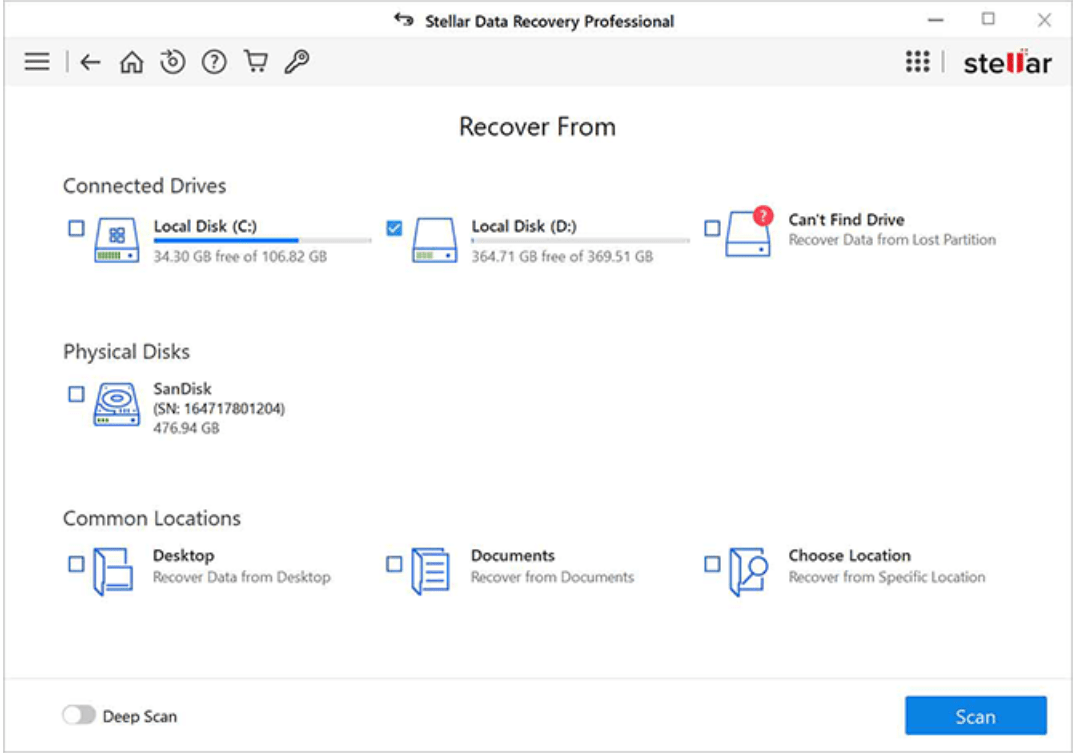
Stellar Data Recovery’s installation procedure was simple and quick. A wide spectrum of people can utilise the program because it is compatible with both Windows and Mac operating systems. My first impression of the programme was its clear, user-friendly UI. Even those who are not tech-savvy will find it simple to walk through the recovery procedure thanks to the user-friendly design.
Features and Performance:
Versatility: Stellar Data Recovery supports a wide range of file formats, from standard documents and images to videos and emails. It can recover data from hard drives, SSDs, USB drives, and even SD cards.
Scan Options: The software offers two scanning modes – Quick Scan and Deep Scan. While the Quick Scan is faster and suitable for recently deleted files, the Deep Scan delves deeper into the storage device to retrieve older and more stubborn files.
Preview Function: One feature I particularly appreciated was the ability to preview files before recovery. This ensures that you’re recovering the right files and not wasting time on irrelevant ones.
Recovery Speed: In my tests, the recovery speed was impressive. While the Deep Scan took longer, it was expected given the thoroughness of the search.
Advanced Features: For more tech-savvy users, Stellar offers advanced features like lost partition recovery and optical media recovery. There’s also a dedicated feature for recovering data from crashed systems.
Pricing:
While Stellar Data Recovery does offer a free version, it has limitations on the amount of data you can recover. The paid versions, however, offer unlimited data recovery and come with additional features. Considering the software’s capabilities, I found the pricing to be reasonable and competitive.
Download Stellar Data Recovery from here (Discounted Price)
| Stellar Data Recovery | Click here to download or buy the product |
| Stellar Toolkit for Data Recovery | Click here to download or buy the product |
| 10% off on Stellar iPhone Data Recovery (Mac) | Click here to download or buy the product (Coupon code – IRECOVER) |
| 10% off on Stellar Data Recovery for Windows | Click here to download or buy the product (Coupon code – WIN10) |
| 10% off on Stellar Repair for Video (Windows) | Click here to download or buy the product (Coupon code – VIDEO10) |
| 10% Off on Stellar iPhone Data Recovery (Windows) | Click here to download or buy the product (Coupon code – IRECOVER) |
Recovery Success Rate:
I recently lost data and turned to Stellar Data Recovery Professional for help. This software impressively recovered my crucial data from various storage devices like hard drives, SSDs, USBs, and even optical discs. Its compatibility with multiple file systems like NTFS and exFAT ensured recovery from different formats. The user-friendly interface made the process simple, and its ability to recover data from 4K media drives was a standout feature. Overall, Stellar Data Recovery Professional is reliable, efficient, and highly recommended for anyone needing a top-notch data recovery solution.
FAQ – Stellar Data Recovery Professional
Q: What is data recovery?
A: Data recovery is the process of restoring lost, damaged, or deleted data from storage devices such as hard drives, solid-state drives (SSDs), USB drives, memory cards, and more.
###
Q: How does data recovery work?
A: Data recovery works by scanning the storage device for any traces of lost or deleted data. It then reconstructs the data using various algorithms and techniques to restore it back to its original state.
###
Q: What is Stellar Data Recovery?
A: Stellar Data Recovery is a software tool designed to help users recover their lost or deleted data from various storage devices. It is known for its advanced algorithms and user-friendly interface.
###
Q: How can I use Stellar Data Recovery to recover my lost or deleted data?
A: To recover your lost or deleted data using Stellar Data Recovery, you need to download and install the software on your computer. Then, launch the software and follow the on-screen instructions to select the storage device and initiate the recovery process.
###
Q: Can Stellar Data Recovery recover lost data from a corrupt storage device?
A: Yes, Stellar Data Recovery can recover data from a corrupt storage device. It has advanced algorithms that can bypass the corrupt sectors and extract the data from the accessible parts of the device.
###
Q: Can Stellar Data Recovery recover all types of files?
A: Yes, Stellar Data Recovery supports the recovery of various file types, including documents, photos, videos, audio files, emails, and more. It can recover files of different formats from different storage devices.
###
Q: Is there a free version of Stellar Data Recovery tool available?
A: Yes, Stellar Data Recovery offers a free version that allows you to scan your storage device and preview the recoverable files. However, to actually recover the files, you’ll need to upgrade to the paid version of the software.
###
Q: What is a disk image in data recovery?
A: A disk image is an exact copy of the entire storage device, including all the data and file system information. It is used in data recovery to create a virtual representation of the original device, making it easier to recover data without further damaging the device.
###
Q: Can I recover data from an external storage device using Stellar Data Recovery?
A: Yes, Stellar Data Recovery can recover data from external storage devices such as USB drives, external hard drives, memory cards, and more. Just connect the device to your computer and follow the recovery process.
###
Q: Is Stellar Data Recovery Professional one of the best data recovery software available?
A: Yes, Stellar Data Recovery is regarded as one of the best data recovery software available due to its powerful features, high success rate, and positive user reviews. It has been trusted by millions of users worldwide.
keywords: recovery tool for deletion and accidental deletion stellar data recovery review free download software reviews file recovery file recovery recover lost or deleted data 1gb of data